    void Start()
    {
        this.plane = new Plane(Vector3.up, transform.position);
    }


     void Turn()
    {
        ray = cam.ScreenPointToRay(Input.mousePosition);
        plane.Raycast(ray, out float enter);
        var hitPoint = ray.GetPoint(enter);
        Vector3 dir = hitPoint - this.transform.position;
        dir.y = 0; // y축 회전만 적용
        if (dir != Vector3.zero)
        {
            Quaternion targetRotation = Quaternion.LookRotation(dir);
            this.transform.rotation = Quaternion.RotateTowards(this.transform.rotation, targetRotation, turnSpeed * Time.deltaTime);
        }
    }
플레이어 위치 기준으로 바닥에 가상의 판을 만들어서
그 판에 레이를 쏴서 닿는 위치로 보게 하는 내용
__________________________________________________________
    private void Awake()
    {
        //마스터 클라이언트의 씬 자동 동기화 옵션
        PhotonNetwork.AutomaticallySyncScene = true; // 동기화된 씬 사용
        //방장이 새로운 씬을 로딩 했을 때 해당 룸에 입장한 다른 접속 유저들에게도
        //자동으로 해당씬을 로딩해주는 기능


        PhotonNetwork.GameVersion = gameVersion; // 게임 버전 설정
        PhotonNetwork.NickName = userName; // 플레이어 이름 설정

        //포톤 서버와의 데이터의 초당 전송 횟수
        //print(PhotonNetwork.SendRate);

        PhotonNetwork.ConnectUsingSettings(); // 포톤 서버에 연결
    }
AutomaticallySyncScene : 씬 자동 로딩
씬매니저 LoadScene을 해도, 자동으로 LoadLevel로 처리 되는 기능
LoadLevel : 모든 플레이어가 다 같이 해당 씬으로 이동
    public override void OnCreatedRoom()
    {
        //룸 생성 완료 후 호출되는 콜백 함수
        Debug.Log("방 생성");
        Debug.Log($"방 이름: {PhotonNetwork.CurrentRoom.Name}");
    }

        public override void OnJoinedRoom()
    {
        Debug.Log("방에 입장했습니다.");
        Debug.Log($"{PhotonNetwork.InRoom}");
    }


    룸을 생성하면, joinedRoom되기 전에 CreatedRoom이 먼저 실행됨
_______________________________________________________
actorNumber
    public override void OnJoinedRoom()
    {
        Debug.Log("방에 입장했습니다.");
        Debug.Log($"{PhotonNetwork.InRoom}");
        Debug.Log($"{PhotonNetwork.CurrentRoom.PlayerCount}");

        foreach (var player in PhotonNetwork.CurrentRoom.Players)
        {
            Debug.Log($"플레이어 이름: {player.Value.NickName}, 플레이어 ID:{player.Value.ActorNumber} ");
            //NickName은 고유의 값이 아니라서 동일한 닉네임이 존재할 수 있다.
        }
    }
플레이어가 가지는 고유 번호

로그 찍어서 체크 가능
_________________________________________________________________________________
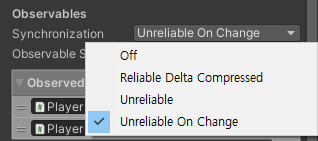
Synchronization의 옵션에 대한 정확한 설명
Off : 동기화 안함, RPC호출만을 위한 PhotonView일때 적합하다
-> 사례 :
1. 게임이 종료 될 때, 모든 플레이어에게 결과를 알리고 결과창을 띄워줄 때
2. 모든 플레이어의 준비가 완료되면 게임 시작을 알릴 때
3. 게임에서 게임타이머를 관리하고 특정 이벤트를 발생시킬 때
뭔가 데이터를 전달해야하는 일 없이, 그냥 Action처럼, 특정 이벤트만 발생시키는 경우에 쓰게 된다.
Reliable Delta Compress : 데이터 송신이나 수신을 보낼만한 상황이 아니면 보내지 않다가, 보낼만한 상황이 됐을때 보낸다.
마지막 데이터가 변경되지 않을 때 데이터를 송신하지 않는다.
Unreliable : 송신한 패킷(데이터 전송 단위)의 1024byte 수신여부를 확인하지 않는다.
받은지 확인안하고 계속 보낸다
Unreliable On Change : Unreliable과 동일하되, 변경이 생겼을때만 송신한다.
____________________________________________________________
RPCTarget
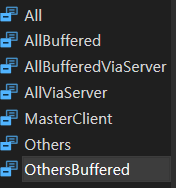
    public enum RpcTarget
    {
        /// <summary>Sends the RPC to everyone else and executes it immediately on this client. Player who join later will not execute this RPC.</summary>
        All,

        /// <summary>Sends the RPC to everyone else. This client does not execute the RPC. Player who join later will not execute this RPC.</summary>
        Others,

        /// <summary>Sends the RPC to MasterClient only. Careful: The MasterClient might disconnect before it executes the RPC and that might cause dropped RPCs.</summary>
        MasterClient,

        /// <summary>Sends the RPC to everyone else and executes it immediately on this client. New players get the RPC when they join as it's buffered (until this client leaves).</summary>
        AllBuffered,

        /// <summary>Sends the RPC to everyone. This client does not execute the RPC. New players get the RPC when they join as it's buffered (until this client leaves).</summary>
        OthersBuffered,

        /// <summary>Sends the RPC to everyone (including this client) through the server.</summary>
        /// <remarks>
        /// This client executes the RPC like any other when it received it from the server.
        /// Benefit: The server's order of sending the RPCs is the same on all clients.
        /// </remarks>
        AllViaServer,

        /// <summary>Sends the RPC to everyone (including this client) through the server and buffers it for players joining later.</summary>
        /// <remarks>
        /// This client executes the RPC like any other when it received it from the server.
        /// Benefit: The server's order of sending the RPCs is the same on all clients.
        /// </remarks>
        AllBufferedViaServer
    }
All : 전부다
Others : 나뺴고 다
MasterClient : 호스트만
AllBuffered : 기록(채팅 로그 등)을 전부 다
OthersBuffered : 기록(채팅 로그 등)을 나빼고 다
AllViaServer : 호출시 동시성이 필요한경우 접속해있는 모든 네트워크 유저에게 동시에 전송
AllBufferedViaServer : 호출시 동시성이 필요한경우 접속해있는 모든 네트워크 유저에게 동시에 전송(기록까지)
        this.GetComponent<Rigidbody>().AddRelativeForce(Vector3.forward * 100f);
        // 상대적 전방으로 힘을 가함
        // = this.GetComponent<Rigidbody>().AddForce(this.transform.forward);
RelativeForce가 좀더 직관적인거같긴함
_________________________________________________________________________
TextMeshPro

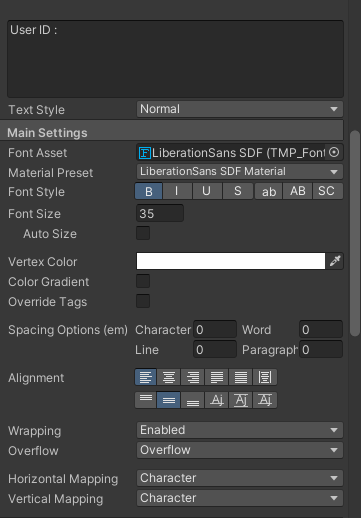
좀 더 쓰기 편하게 많은 기능이 있음
___________________________________________________
Volume에서 Depth Of Field
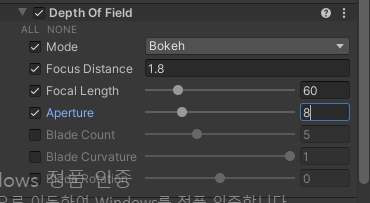
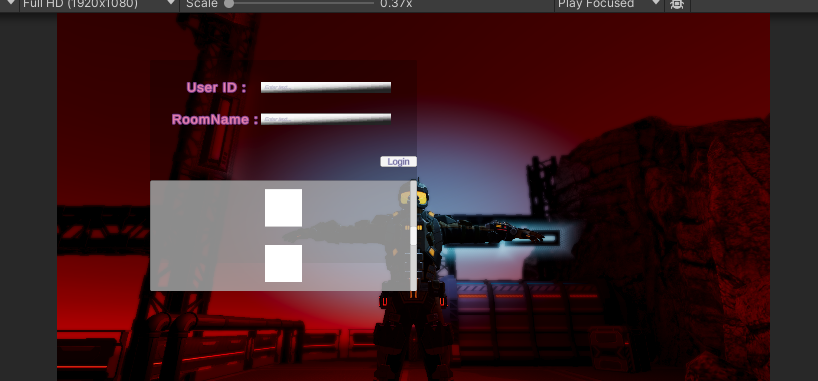
주변에 블러 처리
____________________________________________________
스크롤 UI 가운데에서 시작하는 문제
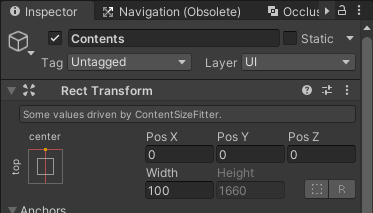
Content 위치 조절하면 해결