var statDataType = AppDomain.CurrentDomain.GetAssemblies()
    .SelectMany(a => a.GetTypes())
    .FirstOrDefault(t => t.Name == "StatData");
AppDomain : GetAssemblies를 하면 해당 프로젝트 내에 있는 내용을 가져오는 느낌
https://kukuta.tistory.com/376
[C#] AppDomain.GetAssemblies 메소드 사용하기
들어가며서버를 만드는데 메시지를 핸들링하는 클래스를 만들때 마다 디스패칭을 해줄 수 있는 어딘가에 매번 등록하는게 귀찮았다.'C#에는 리플렉션도 있는데 특정 클래스를 상속 받으면 해당
kukuta.tistory.com
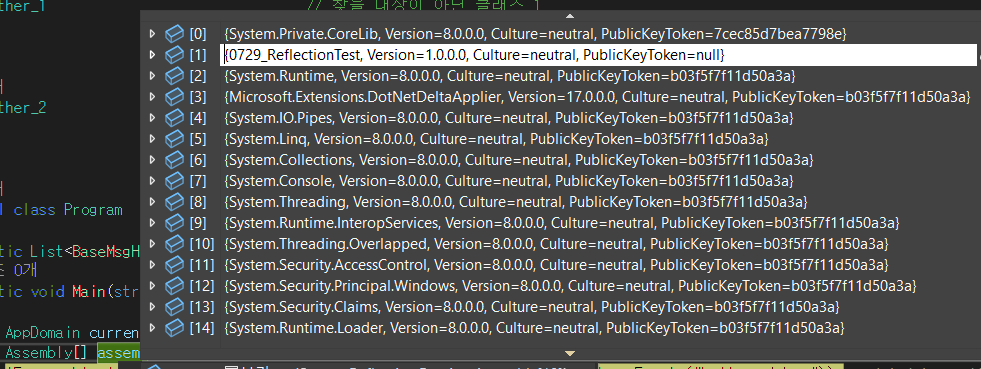
저런식으로 뭔지 모를 것들까지 다 가져온다
1번 항목이 일단 해당 솔루션의 내용
SelectMany : 추출하려는 형태가 리스트 등의 형태일때, 그냥 Select를 하면 그 자료형을 뽑아오게 된다.
이때 SelectMany를 하면 리스트를 다 풀어서 내부의 자료들을 전부 가져온다.
반환 자료형은 ienumerable(리스트 등)
-> GetAssemblies로 받아온, 프로젝트 내의 모든 코드 관련 내용에서,
SelectMany를 통해서 GetType()으로 이 프로젝트 내에 모든 타입을 받아온다.
https://jettstream.tistory.com/121
C# Select vs SelectMany
Select() 메서드 객체에 담긴 여러 데이터 중에서 원하는 부분만 손쉽게 추출하여 새로운 형태의 컬렉션으로 생성한다. public class Program { public class Winner { public string name; public int[] years; } public static
jettstream.tistory.com
FirstOrDefault : 위에서 SelectMany를 해서 나온 결과물에서, 타입중에 이름이 StatData인것.
그중 맨 처음 나오거나, 안나오면 기본값이란건데,
사실상 자료형이라는게 2개 이상 있을리없다.
그리고 기본값은 null로 되어있는듯하다.
// 2) 타입이 없으면 스킵
if (statDataType == null)
{
    Debug.LogWarning("StatData 클래스가 정의되지 않아 처리하지 않습니다.");
    yield break;
}
그래서 없으면 스킵하고,
있으면 statDataType은 해당 타입을 잡는다
Dictionary<int, dynamic> statDatas = new Dictionary<int, dynamic>();동적 자료형인 dynamic을 이용해서, dictionary를 만든다.
var all = GameObject.FindObjectsOfType<Transform>(true);//모든 게임 오브젝트 다
Transform이 붙은 게임오브젝트 찾기 -> 그냥 모든 게임오브젝트
(true) -> 비활성화되어있는것까지 전부 다
foreach (var go in all)
{
	var scripts = go.gameObject.GetComponents<MonoBehaviour>();
	foreach (var script in scripts)
	{
		Type type = script.GetType();
		var fields = type.GetFields(BindingFlags.Instance | BindingFlags.Public | BindingFlags.NonPublic);
		//bool hasInt = false;
		foreach (FieldInfo field in fields)
		{

			if (field.FieldType == statDataType)
			{
				//StatData내용 받아오기
				var data = field.GetValue(script);
                var idField = statDataType.GetField("id",
        BindingFlags.Instance | BindingFlags.Public);
				int idValue = (int)idField.GetValue(data);


                //Debug.Log(data.id);
                statDatas.Add(idValue, data);
            }
		}

	}
}
그 모든 게임 오브젝트를 foreach돌려서 하나하나 체크
GetComponents<MonoBehavior>() -> 그 게임 오브젝트에 붙어있는 모든 스크립트들
그걸 다시 foreach돌려서 하나하나 체크
GetType() -> 해당 스크립트의 타입(사실상 클래스명)
그 타입에서 GetFields() -> 변수 내용 뽑아오기
BindingFlags -> 변수 뽑아오는 조건 걸기
Instance -> static아닌거, 동적 멤버들
public -> public인거
nonpublic -> public아닌거
즉, 동적멤버들중 변수 전부 다
if (field.FieldType == statDataType)
해당 필드의 타입이 위에서 잡은 statDataType이라면
해당 필드에서 GetValue(script)를 해서 값을 받아온다
https://cs-solution.tistory.com/23
[C# Reflection] GetValue()와 SetValue() 메서드
지난 글에서 GetField(), GetFields() 메서드를 통해 필드 정보를 FieldInfo 개체 형식으로 받아오는 방법을 알아봤다. [C# Reflection] GetField(), GetFields() 메서드와 FieldInfo 클래스 Type 클래스에 대해 GetField()
cs-solution.tistory.com
해당 내용에 대한 설명이며, 요약하면, script.GetType()했을때 이미 나온 결과물은 script와는 관련이 없어졌고,
->int a = 10이라 할때, 이걸 getType하면 int가 나오고, 이미 내부의 10과는 연관이 없는것과 같다
그래서 GetValue(script)라 하면, 기존의 내용까지 다 들어있는 스크립트를 다시 가져와서, 거기서 값을 가져온다는 느낌이다.
그래서 해당 스크립트에 있는, statData의 값을 가져오고, 그걸 data라는 이름에 넣는다.
그후 statDataType에서, 이름이 id인 동적 public변수의 필드를 받아와서, 위에서 data에 넣어놓은 statData내용에서, id값을 다시 받아온다. GetValue의 구조는 위의 설명과 같다.
그렇게 얻은 statData의 내용을, 위에서 만든 dynamic딕셔너리를 이용해서, id와 data를 이용해서 넣어놓는다.