동영상 서비스가 종료되어 해당 콘텐츠를 재생할 수 없습니다.
using System.Collections.Generic;
using UnityEngine;
using UnityEngineInternal;


public class GridManager : MonoBehaviour
{
    public Vector3 gridWorldSize = new Vector3(50, 50, 50);
    public float nodeRadius = 1f;
    public LayerMask terrainMask;

    Node[,,] grid;
    public bool IsGridSet
    {
        get; private set;
    } = false;
    float nodeDiameter;
    int gridSizeX, gridSizeY, gridSizeZ;

    void Awake()
    {
        nodeDiameter = nodeRadius * 2; //노드 하나의 사이즈, 반지름의 두배
        gridSizeX = Mathf.RoundToInt(gridWorldSize.x / nodeDiameter);
        gridSizeY = Mathf.RoundToInt(gridWorldSize.y / nodeDiameter);
        gridSizeZ = Mathf.RoundToInt(gridWorldSize.z / nodeDiameter);

    }
    private void OnEnable()
    {
        CreateGrid();
        this.IsGridSet = true;
    }
    void CreateGrid()
    {
        grid = new Node[gridSizeX, gridSizeY, gridSizeZ]; // 3D 배열로 그리드 생성
        Vector3 worldBottomLeft = transform.position
            - Vector3.right * gridWorldSize.x / 2
            - Vector3.up * gridWorldSize.y / 2
            - Vector3.forward * gridWorldSize.z / 2; // 중심점 기준으로 그리드의 맨 왼쪽, 맨 아래, 맨 앞쪽 위치 가져오기
                                                     // = 실제 사이즈의 절반만큼 다 빼기
        for (int x = 0; x < gridSizeX; x++)
        {
            for (int z = 0; z < gridSizeZ; z++)
            {
                //x랑 z축만 돌리면서, 위에서 아래로 레이 쏴서 닿은곳 아래로는 전부 장애물 판정
                //terrain은 아래에서 위로 쐈을때 충돌판정이 없다
                Vector3 worldPoint = worldBottomLeft
                    + Vector3.right * (x * nodeDiameter + nodeRadius)
                    + Vector3.forward * (z * nodeDiameter + nodeRadius)
                    + Vector3.up * gridWorldSize.y;// 맨 위층 그리드들의 윗면 중심점


                RaycastHit hit;
                int y = 0;
                int nonObstacleCnt = gridSizeY;
                if (Physics.Raycast(worldPoint, Vector3.down * gridWorldSize.y, out hit, gridWorldSize.y, this.terrainMask))
                    nonObstacleCnt = (int)Vector3.Distance(worldPoint, hit.point) / (int)nodeDiameter;
                for (; y < nonObstacleCnt; y++)
                {
                    grid[x, gridSizeY - (y + 1), z] = new Node(true, worldPoint + Vector3.down * (y * nodeDiameter + nodeRadius), x, gridSizeY - (y + 1), z);
                }
                for (; y < gridSizeY; y++)
                {
                    grid[x, gridSizeY - (y + 1), z] = new Node(false, worldPoint + Vector3.down * (y * nodeDiameter + nodeRadius), x, gridSizeY - (y + 1), z);
                }
            }
        }
    }

    public List<Node> GetNeighbors(Node node) // 노드의 주변 노드들 가져오는것(최대 26개 가능)
    {
        List<Node> neighbors = new List<Node>();

        for (int dx = -1; dx <= 1; dx++)
            for (int dy = -1; dy <= 1; dy++)
                for (int dz = -1; dz <= 1; dz++)
                {
                    if (dx == 0 && dy == 0 && dz == 0) continue;

                    int nx = node.gridX + dx;
                    int ny = node.gridY + dy;
                    int nz = node.gridZ + dz;

                    if (nx >= 0 && nx < gridSizeX &&
                        ny >= 0 && ny < gridSizeY &&
                        nz >= 0 && nz < gridSizeZ)
                    {
                        neighbors.Add(grid[nx, ny, nz]);
                    }
                }
        return neighbors;
    }

    public Node NodeFromWorldPoint(Vector3 worldPos)
    {
        Debug.Log(worldPos);
        float percentX = Mathf.Clamp01((worldPos.x - this.transform.position.x + gridWorldSize.x / 2) / gridWorldSize.x);
        float percentY = Mathf.Clamp01((worldPos.y - this.transform.position.y + gridWorldSize.y / 2) / gridWorldSize.y);
        float percentZ = Mathf.Clamp01((worldPos.z - this.transform.position.z + gridWorldSize.z / 2) / gridWorldSize.z);

        // 0,0,0 기준으로 생각하면, gridManager가 0,0,0 , 그리고 찾아야할 좌표도 0,0,0일때, 해당 좌표는 정중앙이다.
        // 그런 느낌으로 그리드상의 좌표를 맞추는것

        int x = Mathf.RoundToInt((gridSizeX - 1) * percentX);
        int y = Mathf.RoundToInt((gridSizeY - 1) * percentY);
        int z = Mathf.RoundToInt((gridSizeZ - 1) * percentZ);
        //그걸 전체개수(배열이니 1빼서)에 곱하고, 그걸 int로 바꿔서 처리
        return grid[x, y, z];
    }
    public List<Node> FindPath(Vector3 startPos, Vector3 targetPos)
    {
        foreach (var n in grid)
        {
            n.gCost = 0;
            n.hCost = 0;
            n.parent = null;
            n.HeapIndex = 0; // 노드들에 들어있던 heap인덱스(우선순위) 초기화
        }
        Node startNode = NodeFromWorldPoint(startPos);
        Node targetNode = NodeFromWorldPoint(targetPos);
        Heap<Node> openSet = new Heap<Node>(gridSizeX * gridSizeY * gridSizeZ);
        HashSet<Node> closedSet = new HashSet<Node>();
        openSet.Add(startNode);

        while (openSet.Count > 0)
        {
            Node current = openSet.RemoveFirst();
            closedSet.Add(current);

            if (current == targetNode) //현재 위치가 목적지라면
                return RetracePath(startNode, targetNode); // 경로 셋팅 시작

            foreach (Node neighbor in GetNeighbors(current))
            {
                if (!neighbor.walkable || closedSet.Contains(neighbor)) // 이동 불가능하거나, 이미 클로즈셋에 있다면
                    continue;

                int newCost = current.gCost + GetDistance(current, neighbor); // 이동 코스트(실제 이동 거리 계산)
                if (newCost < neighbor.gCost || !openSet.Contains(neighbor)) // 그게 이전보다 비용이 적거나, 아직 오픈셋에 없다면
                {
                    neighbor.gCost = newCost; // 이동 코스트에 넣고
                    neighbor.hCost = GetDistance(neighbor, targetNode); // 휴리스틱(예상 거리) 값 할당하고
                    neighbor.parent = current; // 현재 노드를 부모로 설정

                    if (!openSet.Contains(neighbor)) // 오픈셋에 없다면 추가
                        openSet.Add(neighbor);
                    else// 이미 있다면 업데이트(SortUp해서 위쪽에 있는 애들(부모 노드)와 비교해서 올바른 위치로 이동하도록)
                        openSet.UpdateItem(neighbor);
                }
            }
        }

        return null; // 경로 없음
    }

    List<Node> RetracePath(Node start, Node end) //길 찾기 끝난 이후에 경로 셋팅
    {
        List<Node> path = new List<Node>(); //경로 리스트 셋팅하고
        Node current = end; // 목적지부터 시작해서

        while (current != start) // 시작점이 아닌 동안
        {
            path.Add(current); //경로 리스트에 추가하고
            current = current.parent; // 현재 위치를 부모로 변경
        }
        path.Reverse(); //목적지부터 시작해서 길을 셋팅했으니 뒤집는다
        return path; // 반환
    }

    int GetDistance(Node a, Node b) //일정한 크기의 그리드로 했으니, 그냥 두 그리드 사이의 거리를 구한다.
    {
        int dx = Mathf.Abs(a.gridX - b.gridX);
        int dy = Mathf.Abs(a.gridY - b.gridY);
        int dz = Mathf.Abs(a.gridZ - b.gridZ);
        return dx + dy + dz;
    }
    public bool drawGizmo = false;
    void OnDrawGizmos()
    {
        Gizmos.DrawWireCube(transform.position, gridWorldSize);
        if (grid == null||!this.drawGizmo) return;
        foreach (Node n in grid)
        {
            Gizmos.color = n.walkable ? Color.white : Color.red;
            if (!n.walkable)
            Gizmos.DrawCube(n.worldPosition, Vector3.one * (nodeDiameter * .8f));
        }
    }

    // 내부 Node 클래스
    [System.Serializable]
    public class Node : IHeapItem<Node>
    {
        public bool walkable; // 이동 가능 여부
        public Vector3 worldPosition; // 실제 좌표
        public int gridX, gridY, gridZ; // 그리드 상의 좌표
        public int gCost, hCost; // g코스트 : 이동코스트(실제 거리), h코스트 : 휴리스틱코스트(기대값)
        public Node parent; // 경로 셋팅할때 들어갈 부모(여기로 오기 전에 있을 노드)
        int heapIndex; // 힙에서의 인덱스(우선순위)

        public Node(bool walkable, Vector3 pos, int x, int y, int z)
        {
            this.walkable = walkable;
            this.worldPosition = pos;
            gridX = x; gridY = y; gridZ = z;
        }

        public int fCost { get { return gCost + hCost; } } // f코스트 : 코스트 두개 더한거

        public int HeapIndex
        {
            get { return heapIndex; }
            set { heapIndex = value; }
        }
        public int CompareTo(Node other)
        {
            int cmp = fCost.CompareTo(other.fCost); //g코스트 : 이동코스트(실제 거리), h코스트 : 휴리스틱코스트(기대값) f코스트 : 그 두개 더한거,
                                                    //보통 f코스트가 낮은게 비용이 더 저렴하다고 판단해서 우선순위를 높임
            if (cmp == 0) cmp = hCost.CompareTo(other.hCost);// f코스트가 같으면 h코스트로 비교
            return -cmp; // 더 낮은게 우선순위를 높게 해야하니 - 붙여서 반환
        }
    }
}
GridManager
3d 배열 형태의 grid를 만들고, 관리하는, 실질적으로 길찾는게 이루어지는 코드
Node를 만들때, 이동 가능한 좌표임을 나타내는게 walkable이라는 bool값인데, 이를 체크할때 장애물에 해당하는 collider가 해당 위치에 있는지를 체크한다.
단, terrain의 collider는 그 땅 모양으로만 충돌을 계산하며, 그마저도 아래에서 위로는 충돌을 계산하지 않는다.
이를 그냥 해당 위치에 충돌판정이 있는지만 체크해서 활용하면, 어떻게 배치가 대각으로 갈수 있게 배치가 된다면 땅을 뚫는다.
그렇기에 x축과 z축 기준으로 for문을 돌려, 위에서 아래로 ray를 쏴서 해당 경계 기준 아래는 false, 위는 true로 체크한다.
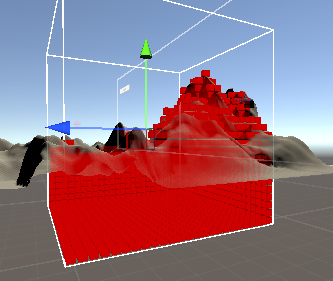
그렇기에 저 terrain아래부분은 어떤 충돌판정도 없었음에도 갈수없는 땅으로 체크될 수 있었다.
using System;
using UnityEngine;

public class Heap<T> where T : IHeapItem<T>
{
    T[] items;
    int currentItemCount;

    public Heap(int maxSize) //최초 셋팅
    {
        items = new T[maxSize]; //최대크기만큼 배열 생성
    }

    public void Add(T item) // 매개변수로 들어간 값을 추가
    {
        item.HeapIndex = currentItemCount; //heapIndex(우선순위)에 현재 개수 집어넣고(가장 낮은 우선순위)
        items[currentItemCount++] = item; //개수 1증가 후 해당 위치에 값 넣고
        SortUp(item); //위로 정렬
    }

    public T RemoveFirst() // 우선순위가 가장 높은 값을 빼냄
    {
        T first = items[0]; // 가장 우선순위가 높은 값을 먼저 first에 넣어둠(얕은 복사라서 주소가 복사됨)
                            // 즉 이 시점에서 first와 items[0]는 같은 값을 가리킴
        currentItemCount--; // 값 하나 뺄 예정이니 전체 개수 -1

        items[0] = items[currentItemCount]; // item의 0번째 위치에 가장 우선순위가 낮은 값 할당
                                            // 이 시점에서 item[0]와 item[currentItemCount]는 같은 값을 가리키고, first는 기존의 item[0]가
                                            // 가리키던 값을 그대로 가리키게 된다.
        items[0].HeapIndex = 0; // 가장 우선순위가 낮은 값의 우선순위를 0으로(가장 높은 우선순위)로 바꾼다.

        SortDown(items[0]); // 올바른 위치를 찾아가도록 아래로 정렬,
                            // 가장 우선순위가 높은 애를 첫번째 위치로 만들 수 있도록
        return first; // 기존의 first를 반환한다.
    }

    public void UpdateItem(T item)
    {
        SortUp(item); //f코스트가 바뀌었을 때, 그거에 맞춰서 우선순위 재정렬
    }
    public bool Contains(T item) //매개변수로 들어온 값이 해당 우선순위 위치에 있는지 확인
    {
        return items[item.HeapIndex].Equals(item);
    }
    public int Count { get { return currentItemCount; } }


    void SortDown(T item) //매개변수로 들어온 값을 아래로 정렬
                          //(우선순위가 가장 높은 값을 빼고 난 후에 가장 우선순위가 낮은애를 위로 올려서 전체 정렬하는 용도)
    {
        while (true)
        {
            int left = item.HeapIndex * 2 + 1;
            int right = left + 1;
            //heap 인덱스가 0으로 시작해서, 루트노드 기준 0, 왼쪽은 1, 오른쪽은 2 / 1기준 왼쪽은 3, 오른쪽은 4
            //매개변수로 들어온 값의 왼쪽과 오른쪽 자식노드의 인덱스 구하기
            int swap = 0;
            //임시 인트값

            if (left < currentItemCount) //left가 전체개수보다 작다면(개수 전체 다 돌리기용)
            {
                swap = left;// swap쪽에 일단 할당
                if (right < currentItemCount &&
                    items[right].CompareTo(items[left]) > 0) // 오른쪽에 전체 개수보다 적고, 오른쪽의 f코스트가 왼쪽보다 작다면
                                                             // (GridManager쪽의 CompareTo참고) 즉 우선순위가 더 높다면
                    swap = right; //swap에 오른쪽 할당

                if (items[swap].CompareTo(item) > 0) //swap에 할당된 값의 f코스트가 매개변수로 들어온 item보다 작다면(우선순위가 더 높다면)
                    Swap(item, items[swap]); // 걔네 둘의 heap인덱스(우선순위)를 바꿈
                else return; // 만약 아니라면, 매개변수로 들어온 값이 올바른 자리에 들어갔다고 판단하고 종료
            }
            else return; // left가 전체개수보다 크다면(자식노드가 없다면) 종료
        }
    }

    void SortUp(T item)//매개변수로 들어온 값을 위로 정렬(새로 값을 추가했을 때)
    {
        int parent = (item.HeapIndex - 1) / 2; // 자식 1, 2인 기준 부모노드는 0일것이고,
                                               // 자식 3 4인 기준 부모노드는 1일것이고(sort down참고)
        while (true)
        {
            var parentItem = items[parent];
            if (item.CompareTo(parentItem) > 0) // 매개변수로 들어온 item의 f코스트가 부모노드보다 작다면(우선순위가 더 높다면)
                Swap(item, parentItem); // 둘의 heap인덱스(우선순위)를 바꿈
            else break; // 아니라면, 매개변수로 들어온 값이 올바른 자리에 들어갔다고 판단하고 종료
            parent = (item.HeapIndex - 1) / 2;// 인덱스가 바뀌었다면, 다시 그것의 부모노드를 구하고 재시작
        }
    }

    void Swap(T a, T b) // 두 매개변수의 우선순위를 바꾸는 내용
    {
        items[a.HeapIndex] = b;
        items[b.HeapIndex] = a;
        int temp = a.HeapIndex;
        a.HeapIndex = b.HeapIndex;
        b.HeapIndex = temp;
    }
}

public interface IHeapItem<T> : IComparable<T> // Node를 위한 인터페이스 셋팅(HeapIndex를 쓰기위해)
{
    int HeapIndex { get; set; }
}
Grid의 내부 Node의 자료 구조를 위한 heap코드
heap은 완전 이진 트리, 맨 위에거 하나 빼면 맨 아래거 위로 올려서 아래로 내리며 정렬하고, 하나 들어오면 맨 아래에서 위로 올리며 정렬하는 내용이 전부 포함되어있다.
using System.Collections;
using System.Collections.Generic;
using UnityEngine;

public class SharkPatrol : MonoBehaviour
{
    [SerializeField]
    Transform[] patrolPoints;
    [SerializeField]
    Transform patrolPointParent;
    [SerializeField]
    Transform target;
    [SerializeField]
    Terrain terrain;
    [SerializeField]
    GridManager gridManager;
    int idx = 0;

    private float speed = 50f;
    private float searchDist = 3000f;
    private float chaseDist = 3000f;
    private float attackDist = 10f;

    public bool test;
    private void Awake()
    {
        this.target = GameObject.FindGameObjectWithTag("Player").transform;
        this.terrain = GameObject.FindFirstObjectByType<Terrain>();
        this.gridManager = GetComponentInChildren<GridManager>();
    }
    private void OnEnable()
    {
        this.patrolPointParent.SetParent(null);
        StartCoroutine(PatrolRoutine());
    }
    WaitForSeconds wsForAttack = new WaitForSeconds(1);
    [SerializeField]
    List<GridManager.Node> path;
    IEnumerator PatrolRoutine()
    {
        while (!this.gridManager.IsGridSet)
        {
            yield return null; // grid셋팅까지 대기
        }
        // 포인트 하나씩 올려가면서 순찰하다가,
        // 앞쪽에 바닥 콜라이더 감지되면 바로 다음 포인트로
        while (true) // 플레이어가 주변에 들어올때까지
        {
            while (Vector3.Distance(this.transform.position, patrolPoints[idx].position) > 1f)
            {
                this.transform.rotation = Quaternion.Slerp(this.transform.rotation, Quaternion.LookRotation(patrolPoints[idx].position - this.transform.position), Time.deltaTime * 10);
                this.transform.Translate(Vector3.forward * Time.deltaTime * this.speed);
                // 앞쪽에 바닥 콜라이더 감지되는지 확인
                if (Physics.Raycast(this.transform.position, this.transform.forward, 4f , 1 << 7))
                {
                    this.idx = (this.idx + 1) % patrolPoints.Length;
                    this.transform.LookAt(patrolPoints[idx]);
                    continue;
                }
                // 타겟이 근처에 왔는지 확인
                if(Vector3.Distance(this.target.position,this.transform.position) < this.searchDist) // 포착 조건
                {
                    this.speed = 200f;
                    while(Vector3.Distance(this.target.position, this.transform.position) < this.chaseDist) // 한번 포착된 다음 따라가는 조건
                    {
                        // 공격 관련 로직
                        if(Vector3.Distance(this.target.position,this.transform.position) < this.attackDist) // 공격 가능 거리 조건
                        {
                            yield return this.wsForAttack;
                        }
                        else
                        {
                            this.transform.LookAt(this.target.position);
                            if (Physics.Raycast(this.transform.position, this.transform.forward,
                                Vector3.Distance(this.transform.position,this.target.position), 1 << 7)) //타겟과 상어 사이에 장애물이 있다면
                            {
                                //var path = this.gridManager.FindPath(this.transform.position, this.target.position);
                                this.path = this.gridManager.FindPath(this.transform.position, this.target.position);
                                Debug.Log(this.target.position);
                                int index = 0;
                                while (Physics.Raycast(this.transform.position, (this.target.position - this.transform.position).normalized,
                                    Vector3.Distance(this.transform.position, this.target.position), 1 << 7))
                                    // 상어와 타겟 사이에 장애물이 있는 동안만
                                {
                                    if (path == null || index >= path.Count)
                                    {
                                        break;
                                    }


                                    Vector3 targetPoint = path[index].worldPosition;
                                    this.transform.LookAt(targetPoint);
                                    this.transform.Translate(Vector3.forward * Time.deltaTime * speed);

                                    if (Vector3.Distance(transform.position, targetPoint) < this.gridManager.nodeRadius)
                                        index++;
                                    yield return null;
                                }
                            }
                            else
                            {
                                this.transform.Translate(Vector3.forward * Time.deltaTime * this.speed); //없으면 그대로 직진
                            }

                                yield return null;
                        }
                    }
                    break; // 순찰 지점을 향해 LookAt하는게 while밖에 도입부에 있기에 break로 나가고 순찰포인트 변경
                }
                this.speed = 50;
                yield return null;
            }
            this.idx = (this.idx + 1) % patrolPoints.Length;

        }
    }
    private void Update()
    {
        if (test)
        {
            test = false;
            DisActive();
        }
    }
    private void DisActive()
    {
        this.patrolPointParent.SetParent(this.transform); // 비활성화될때 비활성화하기전에 다시 집어넣고 비활성화
                                                          // OnDisable에서 부모 건드리는 코드가 안들어감
        this.patrolPointParent.localPosition = Vector3.zero;
        this.gameObject.SetActive(false);
    }
}
그걸 실질적으로 활용하는 SharkPatrol 코드
기본적으로 patrol point들을 순환하는 형태로 되어있다가, target이 근처로 오면 공격상태로 전환, 공격 가능거리 까지 가까이 가면 공격하는 상태 전환 구조가 coroutine을 활용하여 구현되어있다.
추적할때 target까지 ray를 쏴서 사이에 장애물이 있다면, 위의 gridManager를 활용해서 길을 찾도록 되어있다.
추적중에 사이에 장애물이 없는 상태가 된다면, 그대로 직선으로 추적하는 상태로 전환된다.