int[,,] arr = new int[2, 3, 2]
{
    {{ 1,3}, { 3,5}, { 6,78} },
    {{1,6}, { 1,7}, { 3,88} }
};
//왼쪽에서부터 크게 잡으면서 들어감
//ex) 일단 2개짜리 배열 -> 그 배열안에 들어가 있는게 3개짜리 배열 -> 그 3개짜리 배열 안에 들어가 있는게 2개짜리 배열
//대리자

int a = 1;
int b = 2;

MyDel md = Calculator.Plus; // 함수 할당

Console.WriteLine(md(a, b));
md = (a, b) =>
{ int sum = a - b;
    return sum;
}; // 람다식
Console.WriteLine(md(a, b));


delegate int MyDel(int a, int b);
매개변수를 2개받는 함수의 원형을 미리 만들고 사용하는 식
똑같이 매개변수를 2개받는 함수를 대리자에 할당할수 있고, 람다식을 이용해서 함수를 직접 만들수도 있음
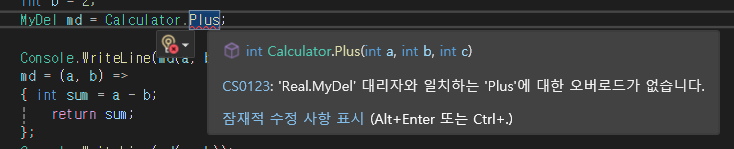
매개변수 개수가 다를 시 에러
대리자 활용법
public static void BubbleSort(int[] arr, bool isIncrease)
{
    int n = arr.Length;
    bool swapped; // 최적화를 위한 플래그: 한 번의 전체 순회 동안 스왑이 없으면 이미 정렬된 상태임
    Compare Compare; //대리자 선언
    if (isIncrease) //조건에 따라 대리자 내용 변경
        Compare = Accending;
    else
    {
        Compare = Deccending;
    }


        for (int i = 0; i < n - 1; i++)
        {
            swapped = false;
            // 마지막 i개의 요소는 이미 정렬된 상태이므로, 내부 반복은 n-1-i 까지만 수행
            for (int j = 0; j < n - 1 - i; j++)
            {
                // 대리자로 받은 조건에 맞으면
                if (Compare(arr[j] ,arr[j + 1]))
                {
                    // 두 요소의 위치를 바꿈 (스왑)
                    int temp = arr[j];
                    arr[j] = arr[j + 1];
                    arr[j + 1] = temp;
                    swapped = true; // 스왑이 발생했음을 표시
                }
            }

            // 최적화: 내부 반복문에서 스왑이 한 번도 발생하지 않았다면,
            // 배열이 이미 정렬된 상태이므로 더 이상 진행할 필요가 없음
            if (swapped == false)
            {
                break;
            }
        }
}
delegate bool Compare(int a, int b); //대리자 선언
static bool Accending(int a , int b)// 오름차순 정렬
{
    return a > b;
}
static bool Deccending(int a, int b) // 내림차순 정렬
{
    return a < b;
}
public static void A5()
{
    int[] arr = { 12, 3, 6, 56, 3, 24, 56, 3, 4, 23,1557, 5, 3, 5, 346, 34, 52 };
    foreach (int i in arr)
    {
        Console.Write($"{i,5}");
    }
    Console.WriteLine();
    BubbleSort(arr, true);
    foreach (int i in arr)
    {
        Console.Write($"{i,5}");
    }
    Console.WriteLine();
    BubbleSort(arr, false);
    foreach (int i in arr)
    {
        Console.Write($"{i,5}");
    }
}
버블 정렬을 메서드 하나만으로 오름차순 내림차순을 둘다 활용가능함
____________________________________________________________________
public class StandLight : MonoBehaviour
{
    Light light;
    void Start()
    {
        this.light = GetComponent<Light>();
        StartCoroutine(this.LightOnOffRoutine());
    }
    IEnumerator LightOnOffRoutine()
    {
        while (true)
        {
            yield return new WaitForSeconds(3);
            this.light.enabled = !this.light.enabled;
        }

    }
}
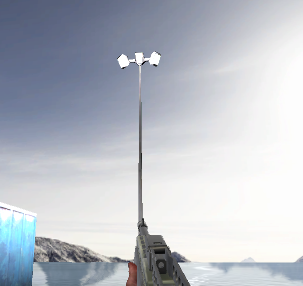
가로등이 3초마다 꺼졌다 켜졌다함
//Mathf.Lerp
(시작값, 끝값, 퍼센트 : 0~1사이값)
그 배율의 크기만큼 변함


IEnumerator GazeRoutine()
{
    float sum = 0;
    while (true)
    {
        sum += Time.deltaTime;
        this.aimImage.transform.localScale = Vector3.one * Mathf.Lerp(0.4f, 0.5f, sum / 0.3f);
        yield return null;
    }
}'2025유니티수업' 카테고리의 다른 글
| 0610 C#(일반화 자료형 T, Dictionary, try catch 예외처리) (0) | 2025.06.10 |
|---|---|
| 0609 C#(리스트 직접 만들기), 유니티 (0) | 2025.06.09 |
| 0604 C#(List, (0) | 2025.06.04 |
| 0603 C#(프로퍼티, 무명형식) (0) | 2025.06.03 |
| 0519 플로우 작성 / 세부 설정 (0) | 2025.05.19 |